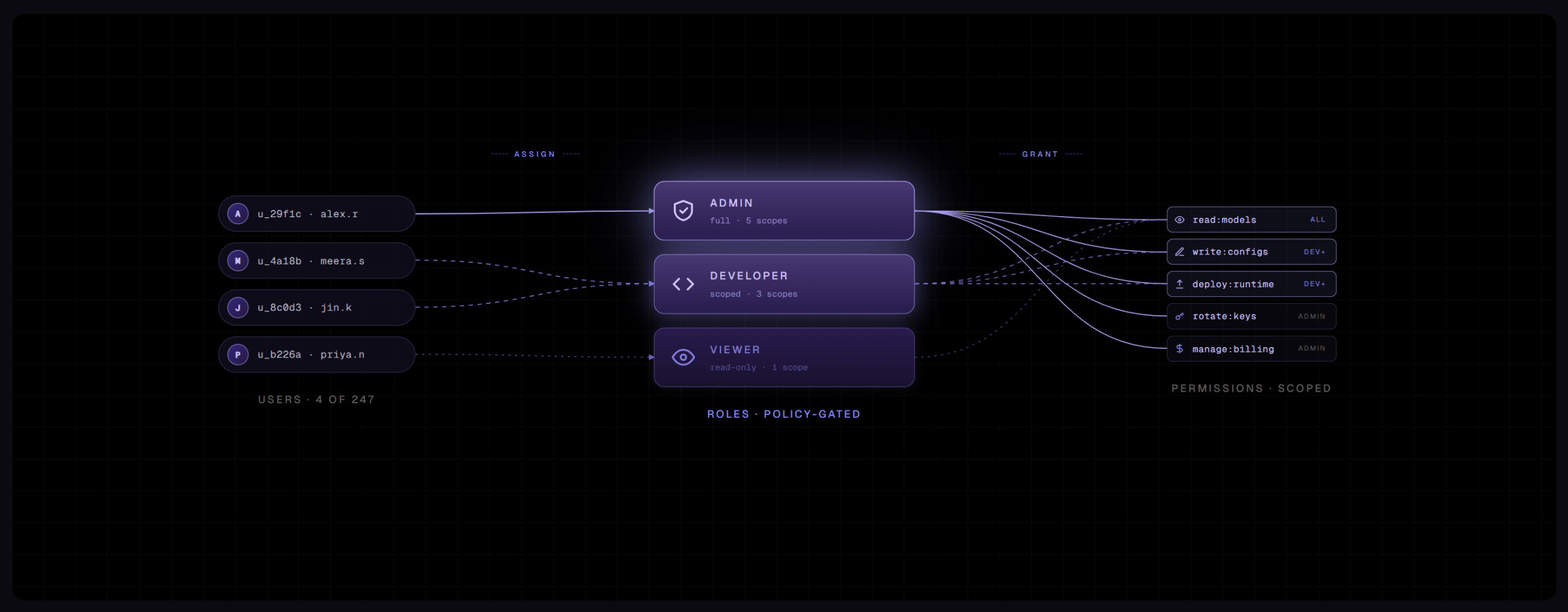
For any enterprise platform, access control is foundational. Admins, employees, and partners all operate with permissioned access across systems like CRM and ERP platforms. These platforms typically use role-based access control (RBAC), which works by grouping platform permissions into roles and then assigning users to those roles. Simple enough.
However, at some point while building Bud Ecosystem, we realized that such traditional approaches to user access control were not optimal for the platform we were building, that is, an enterprise AI management platform.
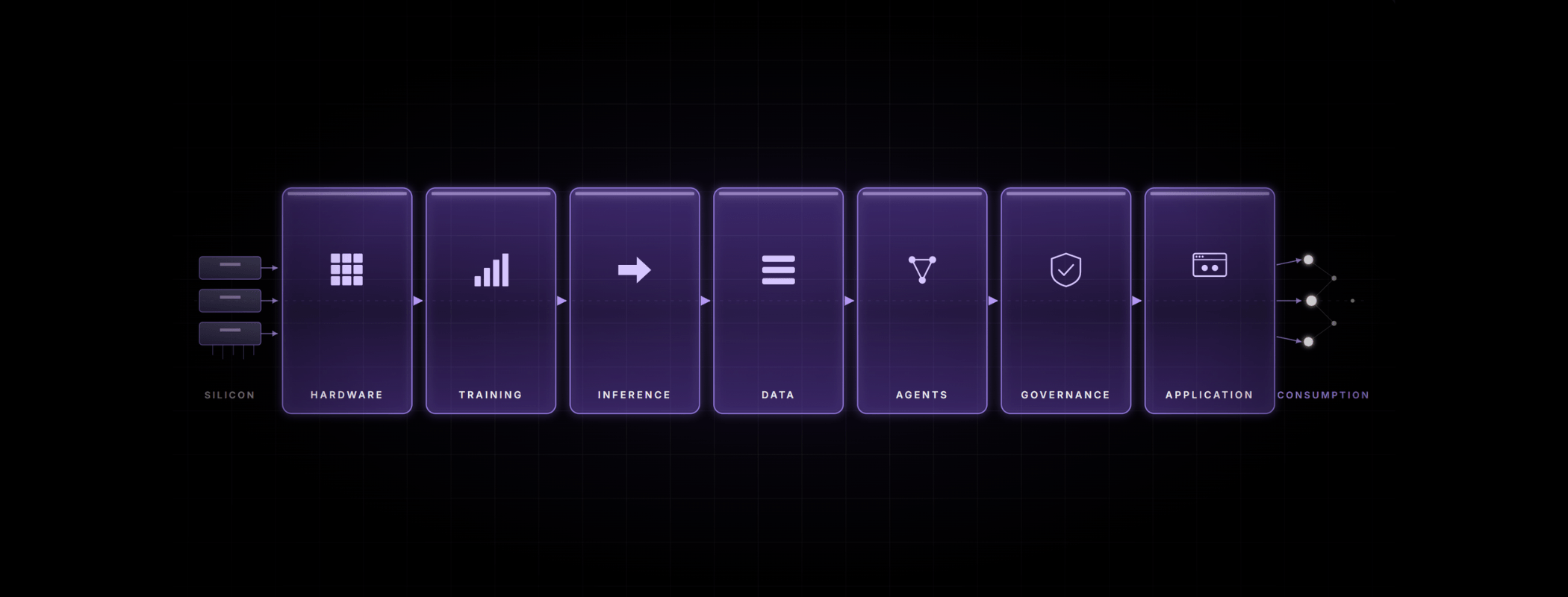
AI operations, orchestrated through an enterprise AI management platform, extend far beyond a single team or workflow. Models, agents, training and inference infrastructure, evaluations, prompts, datasets, MCP orchestrations, security systems, and governance workflows are all consumed across research, engineering, legal, finance, operations, security, compliance, and business teams — each operating with different responsibilities, risk boundaries, and levels of visibility.
An enterprise AI management platform, therefore, cannot rely on static, two-dimensional structures of roles versus permissions. Access control has to mirror the organization itself: cross-functional, department-aware, hierarchical, and adaptable to how enterprises actually operate.
Bud Ecosystem manages the end-to-end AI lifecycle. At that scale, the platform starts behaving less like a product and more like an operating system for enterprise AI. And operating systems cannot rely on patchwork access design. So the question we asked ourselves was simple:
What should access control look like when the platform becomes the connective layer across an enterprise’s entire AI surface area?
Six architectural decisions emerged from that thinking.
1. Projects are the grouping primitive
We had to pick one primitive for grouping users, resources, and permissions. We picked projects. Not teams. Not workspaces.
The reasoning was straightforward. In an enterprise, the unit of work is the project. Sales Copilot. Underwriting Assistant. HR Helpdesk. Each one has a clear business purpose, a clear set of stakeholders, and a clear cost line. More importantly, each one cuts across teams. A Sales Copilot project involves sales leadership defining requirements, sales ops shaping workflows, IT managing infrastructure, security reviewing data access, and compliance validating guardrails. No single team owns it. A team-based grouping primitive would force you to pick a “home team,” and that never reflects how the work actually gets organized. A workspace-based primitive — essentially a collection of projects — adds abstraction without solving the underlying problem of who has access to what within each unit of work.
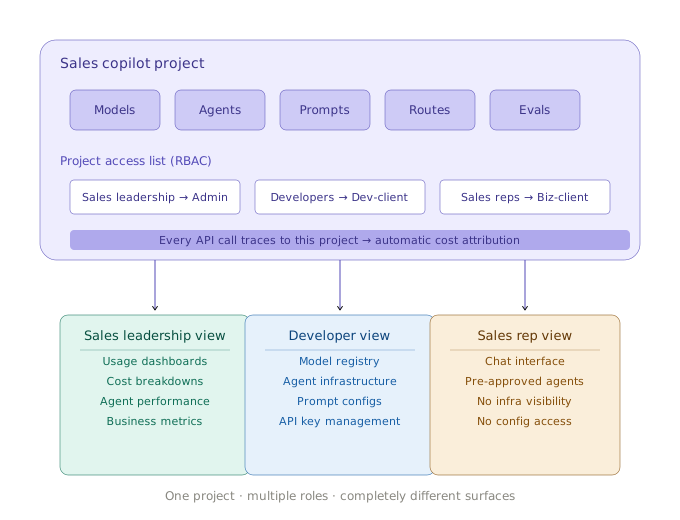
A single team can be involved in multiple projects. IT might touch fifteen. Sales might be part of three. The unit that stays consistent across all of these is the project.
So in Bud Ecosystem, projects own their resources — models, agents, prompt configurations, routes, evaluations, API keys — and each project carries its own access list, built on the same RBAC core that operates at the platform level. This means the same project can present entirely different surfaces to different users. Sales leadership sees usage dashboards and cost breakdowns for running their agents. Sales reps see only the chatbot or agent interface, with no visibility into model registries, infrastructure, or prompt configurations. Developers supporting the project access the model and agent infrastructure they need. A technical admin sees prompts, routing logic, and model configurations. One project, multiple roles, completely different views, all derived from the same permission model.
This choice also reinforced our first architectural decision. Projects provide natural isolation — of resources, data, and access — without requiring any structural changes as teams grow. A pilot project with five people and a production deployment with two hundred users operate within the same boundary. New users are scoped in with the appropriate permissions. Nothing is restructured.
And because every API call, every model invocation, and every resource consumed traces back to a specific project, cost attribution to business units and departments becomes an emergent property of the architecture rather than a separate system layered on afterward.
2. Agents are a user type
Traditional RBAC frameworks assume users are human. That assumption does not hold in an enterprise that is building with AI agents.
Agents authenticate. They call APIs. They retrieve documents. They take actions on behalf of users and, increasingly, on behalf of other agents. They access the same tools, the same knowledge layers, and the same workflows that human users access — sometimes with broader reach. Treating them as an afterthought — a service account here, a bot user there — creates the same patchwork problem we were trying to avoid. Auditing breaks because agent actions are not attributed consistently. Lifecycle management breaks because there is no governed way to provision or revoke an agent’s access. Cost attribution breaks because agent-driven consumption is invisible at the project level.
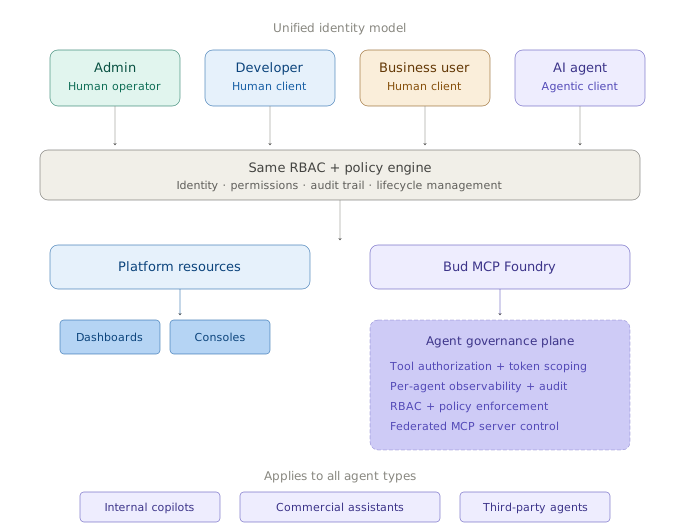
So we made agents a first-class user type in Bud Ecosystem. The same permission model that applies to a human admin or a developer-client applies to an agent. Admins can define what an agent is allowed to access, which tools it can invoke, which systems it should never touch, and how it processes the information it retrieves.
This becomes especially important when you consider the trajectory. An enterprise three years from now will not have five agents. It will have hundreds. Some built internally. Some introduced by vendors. Some belonging to customers or partners calling into the organization’s systems. All of them need access governance, audit trails, and the ability to be revoked.
This is where Bud MCP Foundry extends the access model into the agentic layer. MCP Foundry serves as the governance plane for agent-tool interactions — controlling which agents can call which tools, enforcing authorization and token scoping at the gateway, maintaining per-agent observability and audit logs, and applying the same RBAC and policy controls that govern human users. Whether the agent is an internal copilot built on the organization’s own models, a commercial assistant like Claude or ChatGPT, or a third-party agent calling in through a federated MCP server, every interaction routes through the same control plane. One identity model. One audit trail. One place to answer who accessed what, with whose permission, and at what cost.
We did not want to retrofit agent governance later, after the surface area had already grown beyond what a patchwork approach could manage. Building it into the access model from the start was a deliberate choice — because the distinction between a human user and an AI agent, from an access control perspective, is less meaningful than the distinction between governed and ungoverned.
3. Permissions are four-dimensional, not two-dimensional
Traditional RBAC is two-dimensional. User assigned with a role. That model works when the platform’s domain is simple. It collapses fast in a real enterprise.
Consider an example, an AI architect. They manage cluster infrastructure globally. They administer the Sales Copilot project. They have view-only access to the Underwriting project because they consult but do not own it. They call APIs on the Legal Helpdesk model as part of a cross-functional integration. All at once. All under the same identity.
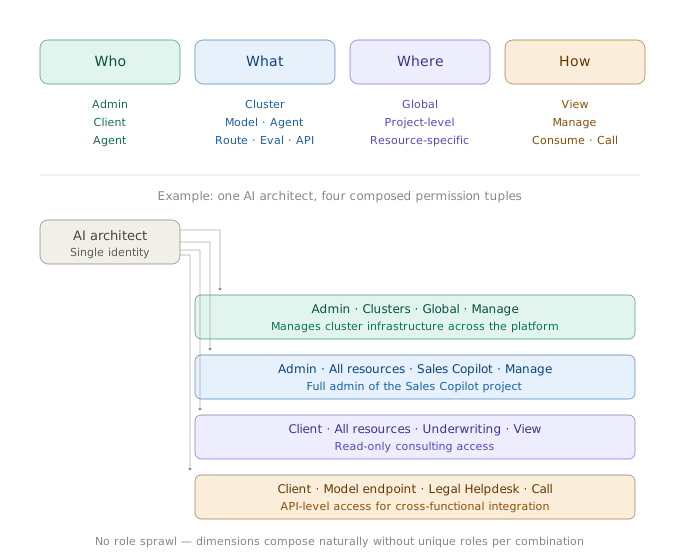
A two-dimensional model cannot represent any of that without ugly hacks — like creating a unique role for every combination of user, resource, scope, and action. We have seen platforms with hundreds of roles for exactly this reason. It becomes unmanageable, and worse, it becomes a governance risk in itself because no one can reason about what any given user is actually allowed to do.
So we made Bud Ecosystem’s permission model four-dimensional. Who, What, Where, and How.
Who is the user, and what type they are — Admin, Client, or Agent. What is the module or resource being accessed — a cluster, a model, an agent, a route, an evaluation, a project, an API. Where is the scope at which the permission applies — global, project-level, or down to a specific resource. How is the action being performed — view, manage, consume, or call.
These four dimensions compose naturally. A single user can hold different combinations of What, Where, and How across different parts of the platform, and the system resolves them consistently without requiring a new role for each combination. The permission model mirrors how enterprise responsibilities actually work — layered, context-dependent, and rarely reducible to a flat matrix.
This is also what makes the previous architectural decisions hold together. Projects as the grouping primitive define the Where. Agents as a user type expand the Who. The four-dimensional model is the underlying structure that lets a single RBAC core express all of it without fragmenting into role sprawl.
4. User hierarchies are flexible, not prescribed
Every organization has its own hierarchy. Imposing a rigid one from the platform side would either force enterprises to reshape their internal structure to fit the tool, or lead to workarounds that undermine the access model entirely.
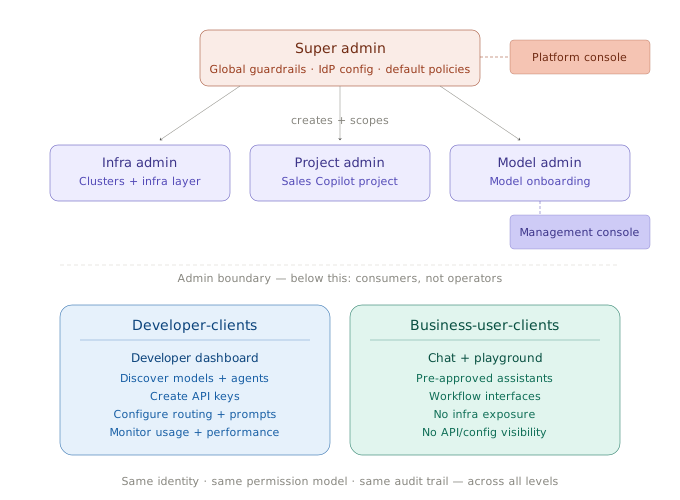
So we reduced the hierarchy to the minimum number of distinct levels that an enterprise AI platform actually requires, and made the structure within those levels flexible enough to reflect how each organization operates.
At the top is the Super Admin, who owns the platform at the organizational level — global guardrails, identity provider configuration, default policies, and cross-cutting governance. But a Super Admin cannot manage everything alone, and should not have to. Below that level, we have specialized Admins. One Admin might own the infrastructure layer. Another might manage the Sales Copilot project. A third might oversee model onboarding for a new product the organization is building. Because projects are the grouping primitive, reflecting organizational hierarchy becomes straightforward — the Super Admin creates Admin users and scopes them to the projects and modules that match their actual responsibilities. The organizational chart maps onto the platform without requiring a parallel governance structure.
Below Admins, we have Clients — the users who consume what the platform produces rather than operate it. This is a meaningful separation, not just a naming convention. An Admin and a Client may interact with the same project, but they see entirely different surfaces. Admins land on the management console, where they configure models, routes, permissions, and policies. Developer-clients land on an OpenAI-style developer dashboard, where they discover available models and agents, create API keys against approved deployments, configure routing and prompt templates, and monitor usage and performance. Business-user-clients — sales reps, legal teams, operations staff — access models and agents through chat interfaces and the Bud Playground, where they work with pre-approved assistants and workflows without ever encountering infrastructure details, model registries, or API configurations.
The hierarchy is minimal by design. Super Admin, specialized Admins, and Clients — with developer and business-user variants within the Client level. Each level has a clear surface designed for it, and each level inherits the same identity, the same permission model, and the same audit trail. The flexibility comes not from adding more levels, but from how these levels compose with projects, modules, and the four-dimensional permission model to express whatever organizational structure the enterprise already has.
5. Permissions can be more than binary rules
Roles and permissions describe what a user is allowed to do. They do not describe context. And in an enterprise, context is where the real access decisions happen.
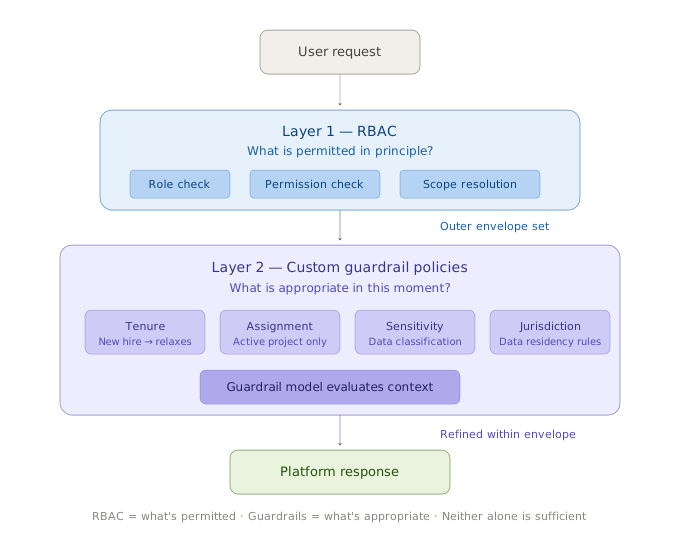
Take a simple example. A developer role has access to architecture documents. That is a reasonable permission. But a developer who joined yesterday should probably not have access to architecture documents on day one. A developer should perhaps have access only while they are actively assigned to a specific project. Or only when the document falls below a certain sensitivity classification. Or only when the developer is not under an active internal investigation.
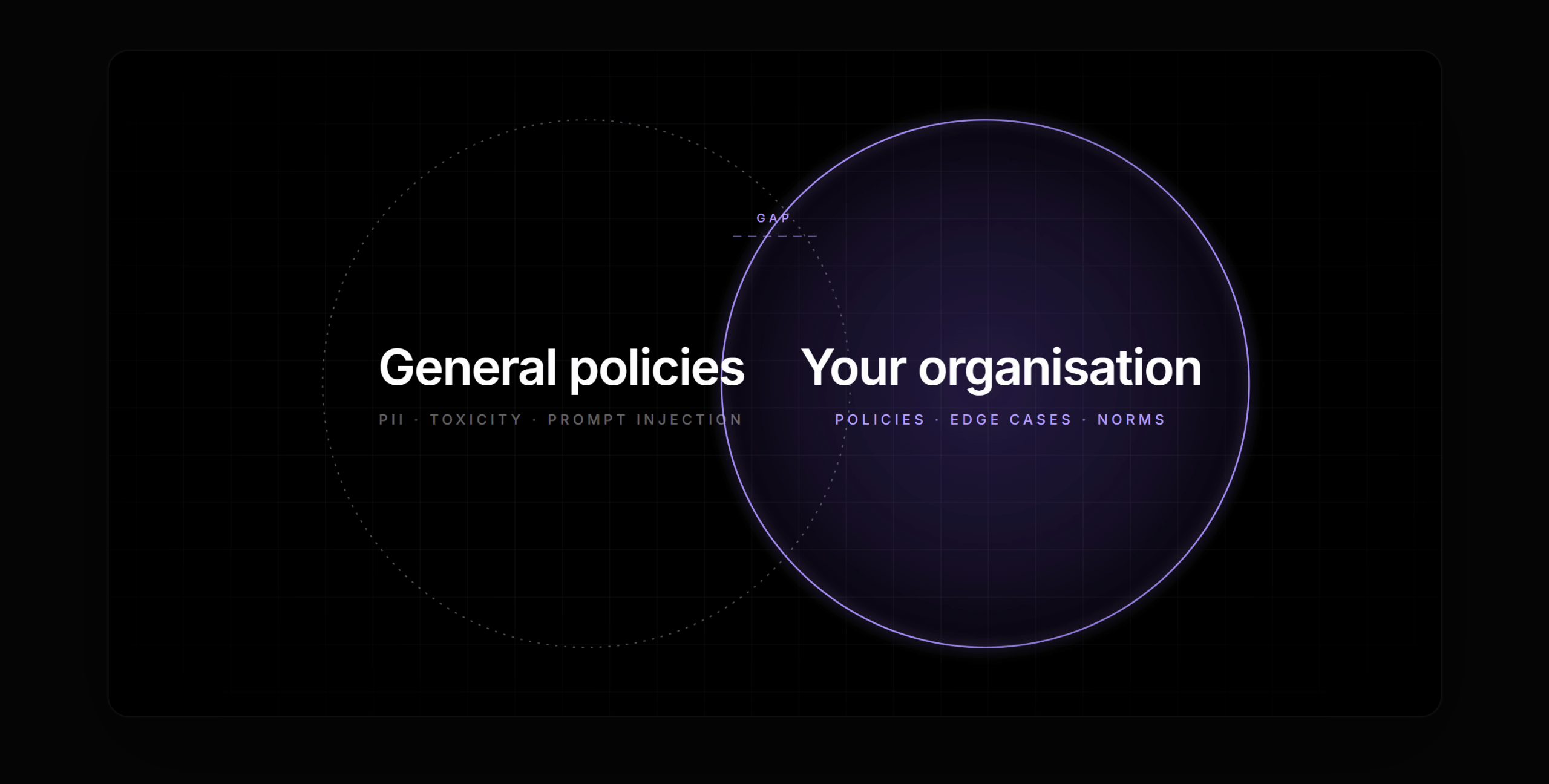
These are real enterprise rules. They come from security teams, compliance officers, legal departments, and HR policies. They do not fit any RBAC matrix, no matter how carefully you design it. A binary “user can do X” rule cannot express time-bounded access, sensitivity-based filtering, departmental separation of duties, or data residency constraints. These rules depend on context that a static permission model simply does not capture.
So we added a second layer. Custom guardrail policies.
Admins define their own policies — the rules that reflect their organization’s specific security posture, regulatory environment, and internal governance requirements. A guardrail model enforces those policies at the point of user interaction, sitting between the user’s request and the platform’s response. The guardrail layer evaluates context that RBAC cannot see — who is making the request, when, under what conditions, against what sensitivity level of data — and applies the organization’s policies in real time.
This is what lets enterprises implement rules that no role-permission matrix can express. New employee restrictions that relax over time. Access that is valid only for the duration of a project engagement. Filtering based on data classification. Separation of duties across departments. Customer data residency rules that vary by jurisdiction.
RBAC tells you what is permitted in principle. Guardrails enforce what is appropriate in this moment. The two layers work together. RBAC sets the outer envelope of what a user can do. Guardrails refine within that envelope based on the context of each interaction. Neither layer alone is sufficient. Together, they give enterprises the kind of access control that reflects how they actually govern their operations — not as a static matrix of roles and resources, but as a living set of policies that adapt to context.
6. Permissions should reflect FinOps policies
Access control in an enterprise is not only about who can do what. It is also about how much they can consume and at what cost. In practice, budget governance and access governance are inseparable — but most platforms treat them as entirely separate systems, managed by different teams, reconciled after the fact.
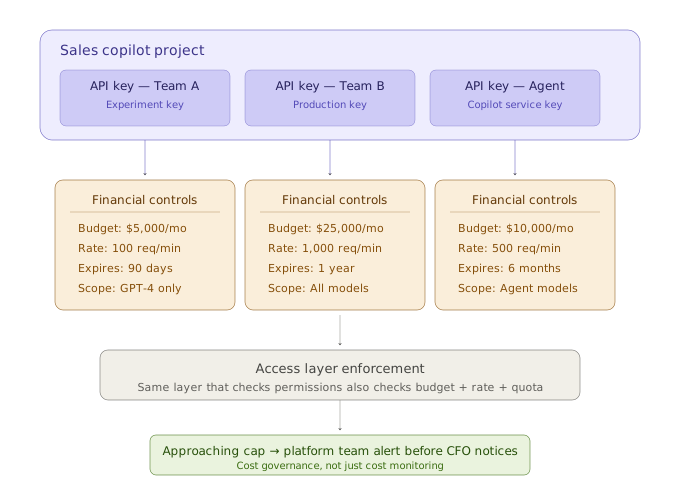
We did not want that separation. If projects are the grouping primitive and every API call traces back to a user, a project, and a team, then financial controls should be expressible within the same permission model.
In Bud Ecosystem, API keys are scoped to projects. Each key can carry its own expiration date, budget cap, and rate limit. Admins can set quotas per key, per client, or per model endpoint. This means a new application team can be issued a key with a 5,000 USD monthly cap and 100 requests per minute. They experiment freely within that envelope. They cannot blow up the business unit’s budget. They cannot starve production traffic by consuming disproportionate capacity. If they approach the cap, the platform team gets an alert before the CFO does.
This is not just cost monitoring — it is cost governance embedded into the access layer. The same project-level scoping that controls which users can access which models also controls how much they can spend and how much throughput they can consume. Budget limits, rate limits, and quotas are not afterthoughts bolted onto a billing dashboard. They are permissions, enforced at the same layer as every other access control decision.
The principle behind this is straightforward. In an enterprise, the platform should make the right thing automatic and the wrong thing impossible. Teams should be able to move fast within clearly defined boundaries. When those boundaries include financial constraints — and in any enterprise operating AI at scale, they always do — the access model should enforce them natively rather than relying on manual oversight and post-hoc reconciliation.
7. Build on the organization’s existing identity infrastructure, not a parallel one
Most GenAI platforms ship with their own user system. That means another set of credentials for users to manage. Another lifecycle for IT to administer. Another audit log for compliance teams to reconcile. Another surface for security teams to monitor, patch, and defend.
We were not going to do that.
If an organization already has user management, access control, and identity infrastructure — and every enterprise does — the platform should plug into it. Not duplicate it. Not ask the organization to maintain a parallel account system just because they adopted an AI platform.
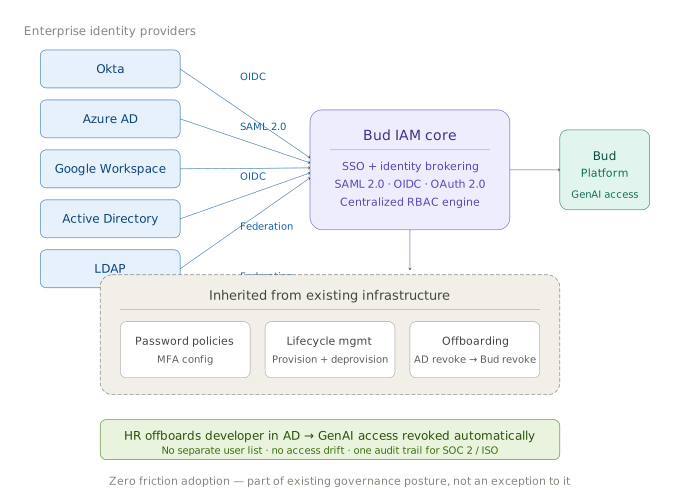
Bud Ecosystem’s RBAC sits on a centralized IAM core with single sign-on out of the box. SAML 2.0, OpenID Connect, and OAuth 2.0 — standard protocols, properly implemented. LDAP and Microsoft Active Directory federation for organizations that run on directory services. Identity brokering for Okta, Azure AD, Google Workspace, and any other OIDC- or SAML-based provider the organization already uses.
What this means in practice is that the organization’s existing password policies, MFA configuration, and offboarding playbooks all apply to GenAI access from day one. Lifecycle management — both provisioning and deprovisioning — is inherited from the existing identity provider, not duplicated inside Bud. When HR offboards a developer in Active Directory, Bud access is revoked automatically. There is no separate user list to maintain. The security team’s existing offboarding process covers GenAI access without modification. SOC 2 and ISO auditors get one identity story to review, not two.
The principle behind this decision is about reducing friction for adoption to zero. Every parallel system an enterprise has to maintain is a governance liability — a place where access can drift out of sync, where deprovisioned users retain access they should not have, where audit trails diverge and reconciliation becomes a quarterly project. By inheriting identity from the infrastructure the organization already trusts, the platform becomes part of the existing governance posture rather than an exception to it.

.png)