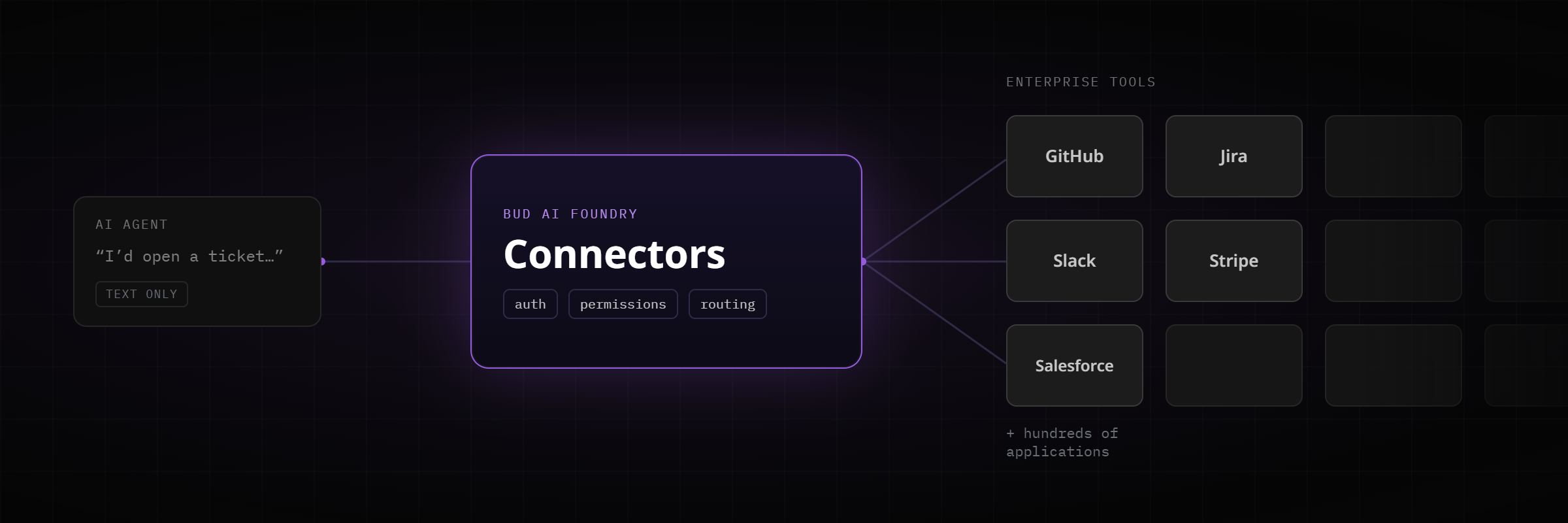
An AI agent that can only produce text is a demonstration. An agent that can create a ticket, update a record in the CRM, post to a channel, or trigger a deployment is doing work. The distance between the two is integration. To act on the world, an agent needs a reliable, permissioned way to reach the tools where that work actually lives.
That sounds simple until you count the tools. A typical enterprise runs on hundreds of applications: source control, issue trackers, project boards, payment systems, chat platforms, internal APIs, and more. Each one speaks its own dialect of authentication, endpoints, and data shapes. Connecting agents to all of them, safely and repeatably, is the real problem behind useful automation.
The Connectors module in Bud AI Foundry exists to solve exactly that.
Integration sprawl
In the traditional approach, every connection between an agent and a tool is hand built. Someone writes the authentication flow, the API glue, and often a bespoke SDK wrapper, then maintains all of it as the underlying services change. With a handful of agents and a handful of tools this is tolerable. It does not stay that way.
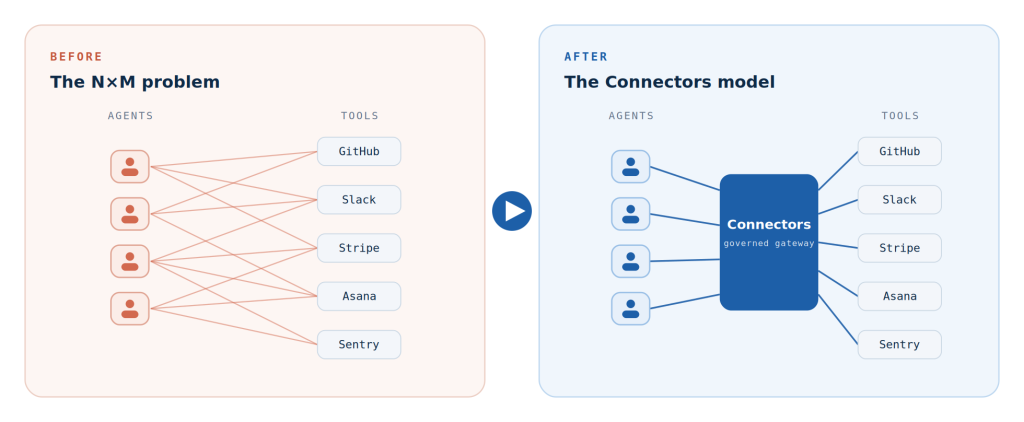
The arithmetic works against you. With N agents that each need M tools, you drift towards N times M separate integrations to build, test, secure, and maintain. Every one is a point-to-point link with its own failure modes. Credentials end up buried in code. Integrations that are no longer used are rarely removed, so they linger as unmonitored attack surface. Each new tool becomes a fresh systems-integration project, and the backlog grows faster than the team can clear it.
This is the quiet reason many agent programmes stall. The intelligence is ready. The plumbing is not. Point-to-point integration grows as the product of agents and tools. A single connector layer replaces that sprawl, and each connector is configured once rather than rebuilt per agent.
What the Connectors module is
The Connectors module is one governed integration layer that sits between your agents and the business tools you already run on. You configure a connector a single time. From that moment it is available to every agent and every workflow in Bud AI Foundry, with no per-agent code.
Under the surface, each connector ships as a pre-built MCP server. MCP, the Model Context Protocol, is an open standard for exposing tools and data to AI applications through a consistent, typed interface. Instead of writing bespoke glue for each application, you configure credentials once and the connector presents a ready set of typed tools that any agent can call. The principle is simple: connect once, use everywhere.
Five capabilities, one control plane
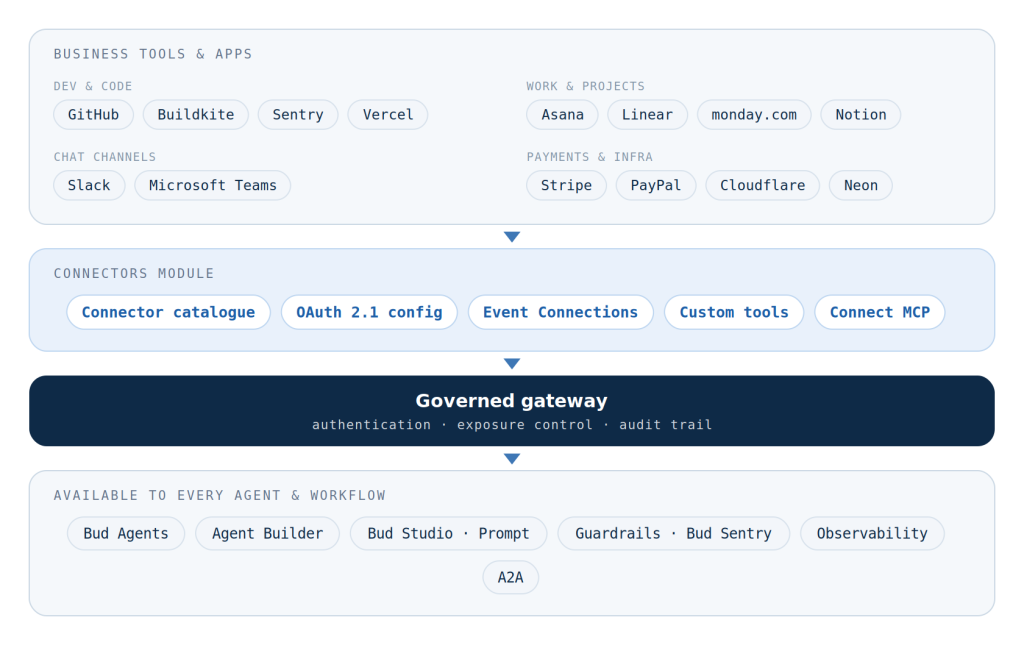
The module brings together everything an agent needs at the tool boundary. There are five parts, and each one removes a different piece of integration work: a connector catalogue, managed connections, Event Connections, custom tools, and Connect MCP.
Connector catalogue
A catalogue of pre-built connectors for the tools businesses use every day, with over a thousand tools and platforms supported in total, including GitHub, Atlassian, monday.com, Asana, Linear, Notion, Slack, Stripe, PayPal, Sentry, Vercel, Netlify, Neon, Buildkite, Cloudflare, and HubSpot. Each entry carries documentation and category tags. Adding one is a one-time Configure flow that captures standard OAuth 2.1 credentials: client ID and secret, the token and authorisation URLs, the redirect URI, scopes, and any passthrough headers.
Managed connections and governance
Once configured, a connector becomes a managed connection behind the gateway. The Connections tab shows the authentication status, the number of tools exposed, and an enable or disable toggle for each connection. Client-level exposure controls decide whether a connection is available in Bud Studio and Prompt surfaces. Every connection carries a connector ID and a gateway ID, so each one stays traceable for audit.
Event Connections
Standard connectors act when an agent makes a request. Event Connections handle the opposite direction: they let external systems notify Bud AI Foundry when something happens. Repository, issue, and task events from providers such as GitHub, Linear, and Asana arrive through signed webhooks and trigger agents automatically. A new support ticket, a successful payment, an uploaded document, or an opened pull request can each start an agentic workflow. Slack and Microsoft Teams work differently again. They act as conversational channels, where the agent replies in place and the team continues the exchange in the same thread.
Custom tools
When something you need is not in the catalogue, a four-step builder turns any REST API into a typed agent tool. The steps are identity (name, description, and tags), endpoint (the REST method, URL, and headers), auth (credentials and secrets), and schema (a JSON input schema, with private or internal visibility). There is no MCP server to write.
Connect MCP
If you already run your own MCP servers, or want to bring a third-party one, Connect MCP registers it directly. You provide the server name, endpoint URL, connection protocol, and authentication details. Transport is auto-detected, including Streamable HTTP. Once registered, the server’s tools are available across Bud AI Foundry like any other connection. For teams that want to build and federate their own MCP servers across an organisation, Bud MCP Foundry handles that end of the workflow.
Governed by default
Making tools available to agents is only half of the requirement. The other half is control. In many do-it-yourself setups, an integration is effectively a secret pasted into a script, with no central record of what exists, who can use it, or how to switch it off. That is difficult to audit and risky to run at scale.
Connectors treats every integration as a managed, auditable asset rather than as buried credentials:
- Standard OAuth 2.1 credential flows for access, rather than hard-coded secrets.
- A central on and off switch for every connection, so an unused integration is disabled instantly instead of lingering as attack surface.
- Client-level exposure controls that decide exactly where a connection can be used, such as in Bud Studio and Prompt.
- Connector and gateway IDs on every connection, so each one is traceable for audit.
This governance is what separates a promising pilot from something an organisation can put into production across many teams and tenants.
What it looks like in a real workflow
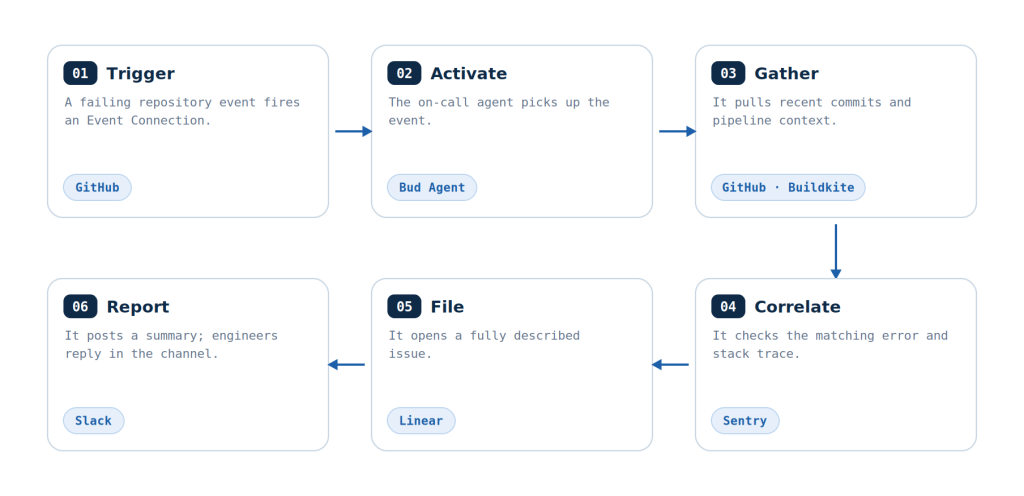
Consider an incident. A repository event fires, and a single agent runs an end-to-end response across five tools without a human touching a dashboard. Every step in the flow below passes through the same governed gateway.
DevOps incident response
The flow above, start to finish. A GitHub event triggers the on-call agent, which gathers context through GitHub and Buildkite, correlates the error in Sentry, files an issue in Linear, and reports to Slack, where engineers continue the conversation with the agent in place.
Project operations in chat
A programme manager asks the agent in Microsoft Teams for the status of this quarter’s initiatives. Through the Asana, monday.com, and Linear connectors, the agent reads boards across teams, creates the missing follow-up tasks, updates statuses where agreed, and replies in the same thread. The tools stay the system of record while the conversation stays in chat.
Payments and dispute operations
A finance agent connected to Stripe and PayPal handles a new dispute. It retrieves the transaction and related payment intent, pulls the customer’s order and refund history, drafts the evidence response, and posts the case summary with a recommended action to the operations channel for a human to approve and submit.
Value by audience
The same layer serves three quite different buyers, because each one feels integration pain in a different place.
Cloud service providers
- A ready-made catalogue as part of a hosted agent service, so customers connect their tools on day one without a custom project per tenant.
- Clean tenant separation, since each customer’s connections run behind their own gateway with their own credentials and controls.
- A premium automation tier built on webhook-triggered agents and in-channel assistants, delivered from the same control plane.
Enterprises
- Connect once, use everywhere. Configure a tool a single time instead of wiring up and maintaining each integration by hand.
- Complete workflows under governance: create a ticket, update the CRM, send a Slack message, trigger a deployment, all with connection-level controls.
- Agents where people work, replying directly in Slack and Teams, plus internal REST APIs turned into tools in minutes.
OEMs
- Embedded agents that fit each stack, integrating through the same connector layer instead of per-customer builds.
- Your own APIs as tools, exposed as custom tools or an MCP server so field-deployed agents act through one typed contract.
- Extend after shipment, as new catalogue connectors and event sources arrive through Bud AI Foundry with no product-side changes.
How it fits the rest of the system
The Connectors module sits at the tool boundary of every Bud Agent. It works alongside the agent layer, which consumes connector tools at runtime; the gateway, which fronts every connection with authentication, exposure, and audit controls; Guardrails and Bud Sentry, which police what flows through; and Observability, which traces every tool call.
Together with Modality, which lets an agent take any supported input, and A2A, which lets agents collaborate with one another, Connectors completes Bud’s interoperability fabric. Any Bud Agent can take any supported input, use any business tool, work with any other agent, and act where the work already happens.
Integration stops being a project
Connectors changes what integration costs. Connecting a business tool drops from a bespoke systems-integration project to a one-time configuration in the catalogue. It changes what agents can do, moving them from isolated answers to complete, end-to-end workflows. And it changes how those integrations are run, turning them into governed, auditable assets with a single switch and clear exposure controls.
Connect the tools your organisation already uses, and they become instantly available to every agent and workflow.

.png)