System One models like TypeSafe's Jev opened up a new category of AI model. Instead of writing an answer token by token, a decision model reads a situation once and weighs every allowed answer, so it responds faster, returns a decision your code can act on directly, and costs far less to run.
The category is no longer a single vendor's. Open models such as Laya, Kev, and CLM already provide the same features, with the same or better accuracy. What has been missing is an easy way to use them. Each comes from a different lab with its own loading code, input format, and hardware assumptions, so learning how one works, trying it on your own data, comparing it with another, or training it for your domain has meant building the tooling first.
That is why we built Bud Decision Studio, the LM Studio for decision models. Today, we are open-sourcing it. It is a simple desktop app that runs on your own computer and lets you work with these models end to end, without any setup:
- Learn: see how a decision model reads a situation and scores each option, live in the Playground.
- Infer: download and run eleven open decision models from one registry, behind one API contract.
- Train: fine-tune a model on a spreadsheet of your own past decisions, on your own GPU.
- Template: save situations and questions as reusable templates with variables.
- Serve: expose any loaded model on a local endpoint at
127.0.0.1:8420. - Integrate: point existing Jev, OpenRouter, or Vercel AI Gateway client code at it by changing the base URL.
All of it runs on hardware you own. Bud Decision Studio works across NVIDIA GB10, Intel Core Ultra, Apple Silicon, AMD, and any CPU, on Linux, Windows, and macOS.
A chat model writes an answer. A decision model weighs every answer.
If you are new to the category, the name comes from the two modes of thought Daniel Kahneman describes in Thinking, Fast and Slow: System 1, which is fast and instinctive, and System 2, which is slow and deliberate. A chat model works the System 2 way on every request, generating its answer one token at a time. A System One model is built for the cases where the answer is one of a known set: route this ticket, rate this risk, pick this tool.
A decision model skips the generative decode loop entirely. You supply the model with two inputs: a situation (plain text, JSON records, email threads, or multimodal inputs like images and audio) and one or more typed questions with explicit candidate options. The model reads the inputs once and scores every allowed candidate simultaneously. The output is a pure mathematical distribution: numbers between 0.0 and 1.0 that sum to 1.0 for each question.
The six question primitives
In traditional machine learning, developers built custom classification heads for each specific task: one model for binary sentiment, a different model for 5-star ratings, and another multi-label network for tagging. Bud Decision Studio abstracts these into six fundamental question primitives. Three are answered natively by the underlying model weights; the remaining three are synthesized by the engine from joint representations:
| Question type | What you define | What the engine returns | Underlying distribution |
|---|---|---|---|
Pick one (choice) |
An explicit list of candidate categories. | Probability per option and the winning selection. | Categorical softmax vector summing to 1.0. |
Rate on a scale (scale) |
Between 2 and 10 ordered semantic levels (e.g. 1 to 5). | Probability per level and the expected continuous centroid. | Ordinal regression with continuous expected value. |
Yes or no (noul) |
A declarative assertion about the state. | A calibrated probability that the assertion is true. | Binary Bernoulli distribution. |
Pick any (multi_choice) |
A list of tags and a probability activation cutoff. | All tags exceeding the cutoff threshold. | Joint independent sigmoid activations. |
Put in order (rank) |
A set of candidates to prioritize. | The candidates ordered from highest to lowest probability. | Permutation probability ranking. |
Estimate a number (range) |
A lower bound, upper bound, and unit step. | A point estimate and an 80% credible interval. | Discretized bounded interval estimation. |
Table 1 — The six decision primitives supported by Bud Decision Studio.
Because the model can only distribute probability across options you supply, the probability of an out-of-vocabulary answer is mathematically zero. Downstream software does not require sanitization or defensive parsing.
Yours, on your machine: zero telemetry and hardware-native execution
A core architectural principle of the Bud Ecosystem is data sovereignty. Bud Decision Studio runs completely locally. The software contains zero usage tracking, zero phone-home metrics, and zero telemetry.
When the desktop application launches for the first time, an automated setup sequence profiles your workstation. It inspects GPU capabilities, compute unified architecture version, unified memory availability, and host CPU instruction sets:
- Apple Silicon (Metal): Native acceleration via MPS and Metal on M1, M2, M3, and M4 Macs.
- NVIDIA Hardware (CUDA): Automatically selects CUDA 12.6, 12.8, or 13.0 based on the installed system display driver. Compatible with GeForce RTX, RTX workstation cards, and data-center chips including NVIDIA GB10 (DGX Spark) and H100s.
- Intel Arc & Core Ultra (XPU): Dedicated Intel GPU acceleration for Core Ultra laptops and Arc discrete cards.
- AMD ROCm: Hardware acceleration for Linux workstations equipped with Radeon and Instinct accelerators.
- Standard x86/ARM CPU: Optimized fallback using multi-threaded PyTorch CPU kernels. Small models (144M to 421M parameters) deliver full inference in under 1,000 milliseconds on standard processors without dedicated accelerators.
Eleven open models across the parameter spectrum
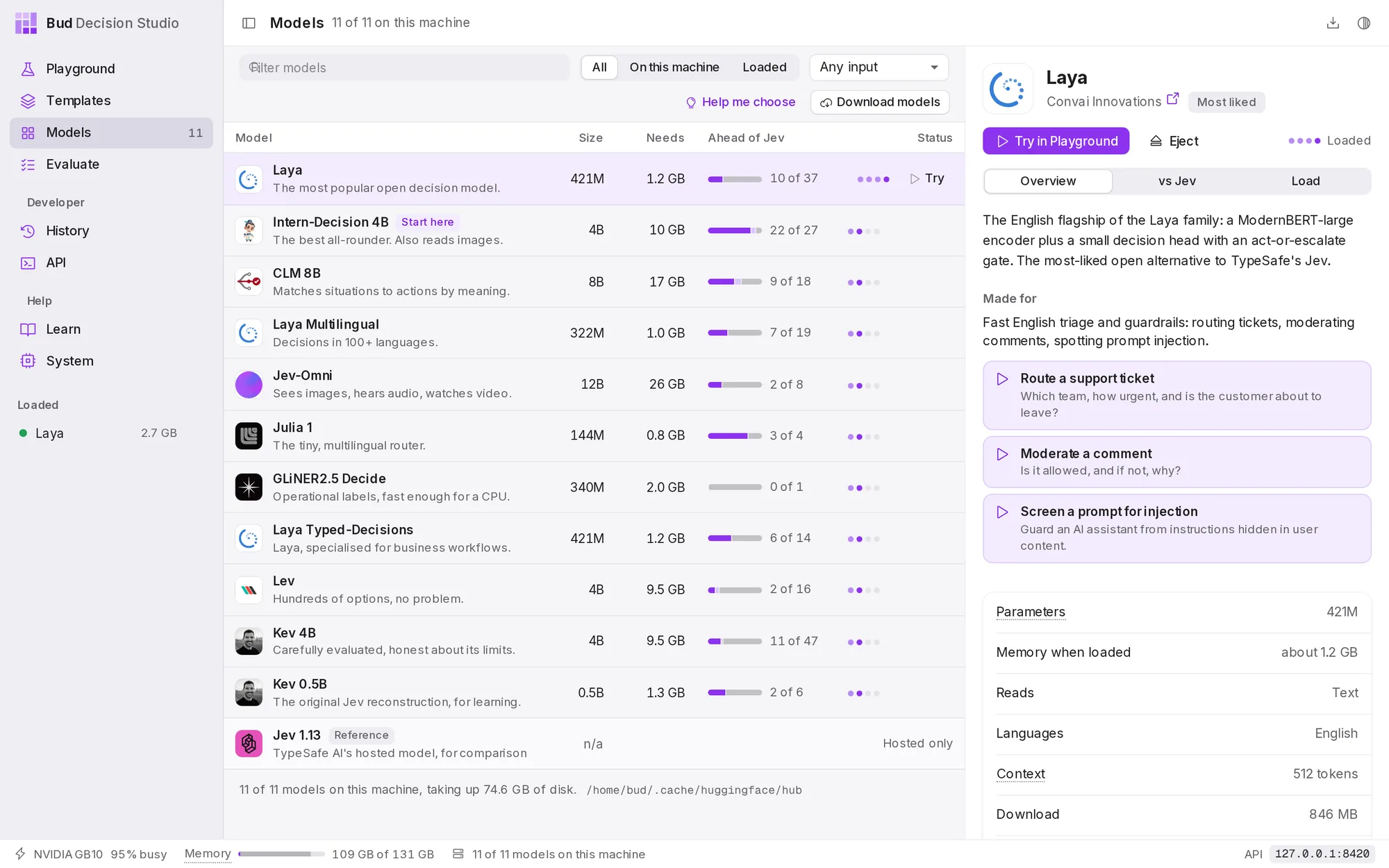
Before Studio, trying a second open decision model meant learning a second codebase. Bud Decision Studio puts eleven open decision models from eight research organizations in one registry, behind one API contract, so moving from one to the next is a download, not an integration project. They span a wide range of footprint, context capacity, and option breadth, which is exactly why being able to compare them side by side matters:
| Model identifier | Parameters | RAM Footprint | Context | Max options / Q | Primary operational domain |
|---|---|---|---|---|---|
julia-1 |
144M | 0.8 GB | 8,192 tok | 20 | Ultra-fast multilingual routing on CPU or edge hardware |
laya-multilingual |
322M | 1.0 GB | 1,024 tok | 20 | Global classification covering 100+ languages |
laya |
421M | 1.2 GB | 512 tok | 20 | High-throughput English triage and prompt safety guardrails |
laya-typed-decisions |
421M | 1.2 GB | 1,024 tok | 20 | Structured financial invoices, security logs, and IT tickets |
gliner2.5-decide |
340M | 2.0 GB | 2,048 tok | 64 | Operational tag filtering; tuned for CPU execution |
kev-0.5b |
0.5B | 1.3 GB | 8,192 tok | 255 | Fast baseline for research and custom fine-tuning |
intern-decision-4b |
4B | 10.0 GB | 8,192 tok | 62 | Multimodal decisions reading both text and image assets |
kev-4b |
4B | 9.5 GB | 8,192 tok | 255 | High-precision calibrated decisions on long policy documents |
lev |
4B | 9.5 GB | 8,192 tok | 500 | High-cardinality routing across hundreds of candidate classes |
clm-v0.1-8b |
8B | 17.0 GB | 2,048 tok | 1,000 | Autonomous agent next-tool selection across huge registries |
jev-omni |
12B | 26.0 GB | 8,192 tok | 256 | Omni-modal decision making across text, images, audio, and video |
Table 2 — Model parameters, memory allocations, context limits, and cardinality ceilings across the studio's supported models.
The act threshold: mathematical certainty for human-in-the-loop workflows
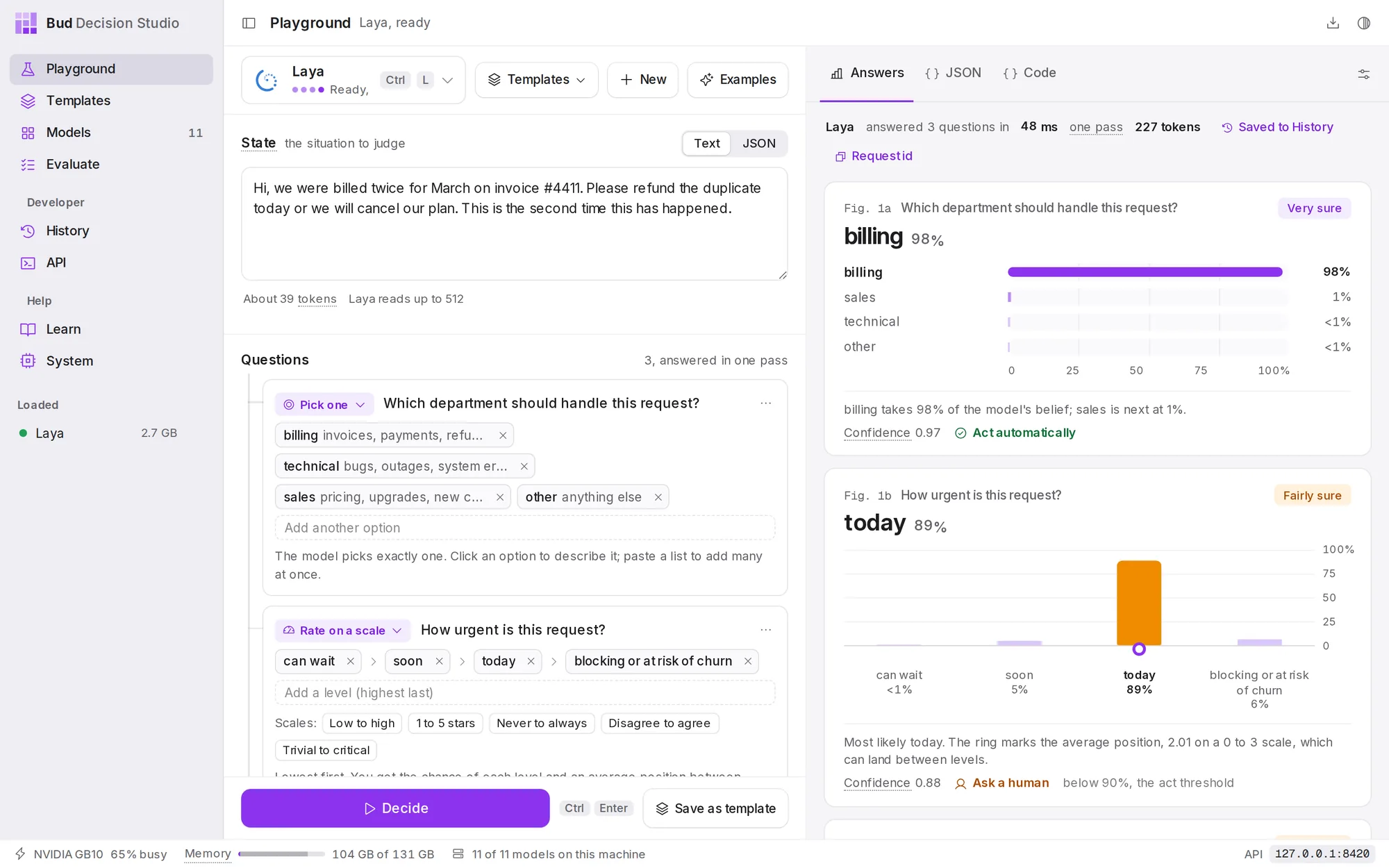
In automated systems, knowing when not to act is more critical than acting rapidly. If a traditional language model claims to be certain, the probability is rarely well calibrated. In contrast, the models integrated into Bud Decision Studio are optimized for probability calibration: if a model assigns 85% probability across 100 decisions, it should be empirically correct on approximately 85 of them.
This property enables the Act Threshold. Inside the studio's Playground and template runtime, developers configure a minimum certainty percentage (e.g. 90%):
- Automated Execution (≥ Act Threshold): When the top candidate's calibrated probability meets or exceeds the threshold, the response flag marks
act: true. Downstream services execute the routing or tool call immediately. - Escalation (< Act Threshold): When probability mass is distributed across ambiguous options, the response marks
act: falseand triggers human-in-the-loop review.
On our benchmark support ticket dataset, setting an act threshold of 90% allows 71% of inbound tickets to be resolved automatically with a 99.4% precision rate. The remaining 29% are surfaced to support specialists with candidate probabilities pre-calculated, cutting mean handling time by more than half.
Drop-in API compatibility: Jev, OpenRouter, and Vercel AI Gateway
Adopting Bud Decision Studio does not require rewriting client applications or ditching existing SDKs. The studio daemon listens on local port 8420 and provides native protocol emulation for the primary decision API standards:
- TypeSafe Jev API:
POST /v1/systemoneandGET /v1/models. Existing code utilizing the officialtypesafe-sdkor@typesafe-ai/sdkruns without modification simply by re-pointing the base URL. - OpenRouter Decisions:
POST /api/v1/systemoneandPOST /api/alpha/decisions. - Vercel AI Gateway:
POST /typesafe/v1/systemoneandPOST /v1/evaluate. - Native Studio Template API:
POST /v1/studio/decisionsandPOST /v1/studio/templateswith variable interpolation and historical logging.
# Query the local decision daemon directly via cURL
curl -s -X POST http://127.0.0.1:8420/v1/systemone \
  -H "Content-Type: application/json" \
  -d '{
    "model": "intern-decision-4b",
    "state": "Customer report: We were billed twice for invoice #4411. Refund immediately or cancel.",
    "questions": {
      "department": {
        "type": "choice",
        "instructions": "Which department handles this?",
        "criteria": { "billing": "refunds and charges", "support": "technical issues", "sales": "upgrades" }
      },
      "urgent": { "type": "noul", "instructions": "Is immediate action demanded?" }
    }
  }'
And calling the same local daemon from Python requires only initializing the standard client with the local endpoint:
from typesafe import TypeSafeClient

# Re-point base URL to local Bud Decision Studio
client = TypeSafeClient(base_url="http://127.0.0.1:8420/v1")

decision = client.decide(
    model="intern-decision-4b",
    state="System log: Redis connection timeout on node-04 after 3 retries",
    questions={
        "action": {
            "type": "choice",
            "criteria": {"restart_service": "", "failover_replica": "", "page_oncall": ""}
        }
    }
)
print(decision.answers["action"].choice, decision.answers["action"].confidence)
Local fine-tuning without catastrophic forgetting
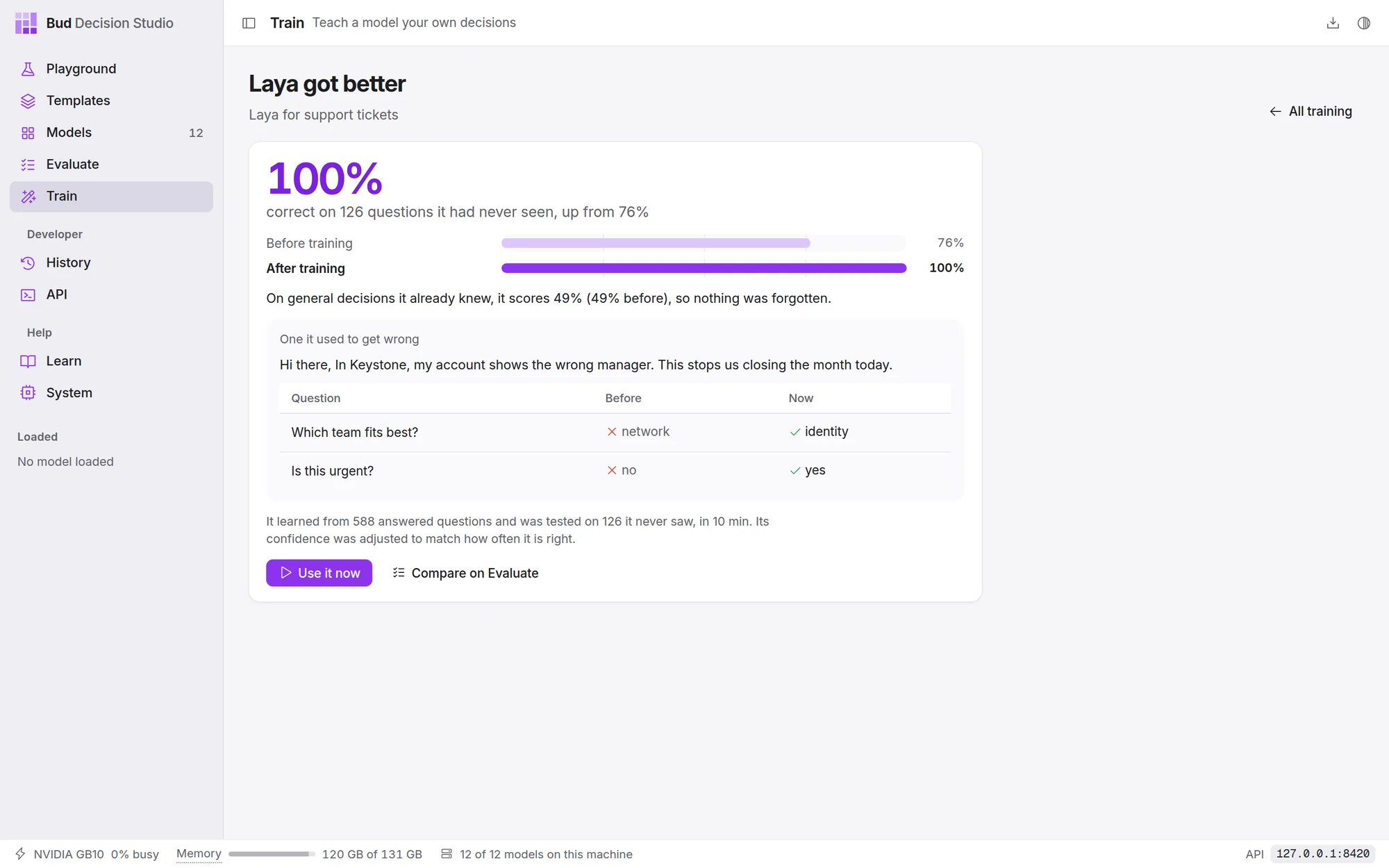
General-purpose decision models perform well out of the box, but specialized enterprise domains — proprietary product taxonomies, bespoke insurance claims, or internal compliance categories — frequently require adaptation. Bud Decision Studio includes a complete graphical Trainer that fine-tunes models directly on your workstation GPU.
The developer provides a simple spreadsheet or CSV containing past examples (one column of situation text and columns representing historical decisions). The studio automatically identifies the question structures, configures training hyperparameters, and trains a lightweight adapter in 5 to 15 minutes on a modern GPU.
Crucially, fine-tuning in Bud Decision Studio incorporates an automated dual-validation safeguard. Before a newly trained model can be deployed or loaded into the Playground, the engine benchmarks it on two separate datasets:
- Held-out Domain Test Set: Verifies that accuracy on unseen domain examples actually improved over the base weights.
- General Capability Benchmark: Evaluates the model on an immutable suite of broad general-knowledge decisions to guarantee that fine-tuning did not induce catastrophic forgetting. If general accuracy drops by more than 0.5 points, the build is rejected.
One line to install and get started
Bud Decision Studio is packaged as a zero-dependency installation that ships with private execution environments tailored to your machine. The installer configures Python and PyTorch within the application directory, avoiding external dependencies or system conflicts.
# macOS (Apple Silicon) & Linux:
curl -fsSL https://raw.githubusercontent.com/BudEcosystem/Bud-Decision-Studio/main/get.sh | sh

# Windows (PowerShell):
irm https://raw.githubusercontent.com/BudEcosystem/Bud-Decision-Studio/main/get.ps1 | iex
Pre-built standalone desktop installers are also available for immediate download:
- macOS: Universal DMG for Apple Silicon Macs (M1 and newer, macOS 12.3+).
- Windows: 64-bit installer executable (
.exe) and enterprise MSI packages for Windows 10 and 11. - Linux: Debian/Ubuntu packages (
.deb), Fedora/openSUSE packages (.rpm), and standalone AppImage bundles for x86_64 and ARM64 systems (including DGX Spark and GB10 nodes).
Review the architecture, inspect model adapters, download the desktop application, or contribute to Bud Decision Studio.
- Open decision models like Laya, Kev, and CLM match the features of System One models like Jev, but until now there was no easy way to learn, try, and train them.
- Bud Decision Studio, the LM Studio for decision models, is now open source: one desktop app to learn, infer, train, template, serve, and integrate eleven open models.
- It runs entirely on your own hardware, with zero telemetry, across NVIDIA GB10, Intel Core Ultra, Apple Silicon, AMD, and any CPU, on Linux, Windows, and macOS.
Latency and throughput benchmarks cite measured performance on an NVIDIA GB10 workstation and an Apple M3 Max laptop running Intern-Decision 4B and Julia 1. Fine-tuning benchmarks were conducted using the built-in Studio Trainer on 588 training examples and 126 held-out test questions across support and policy workflows.


 Kevin Johnson