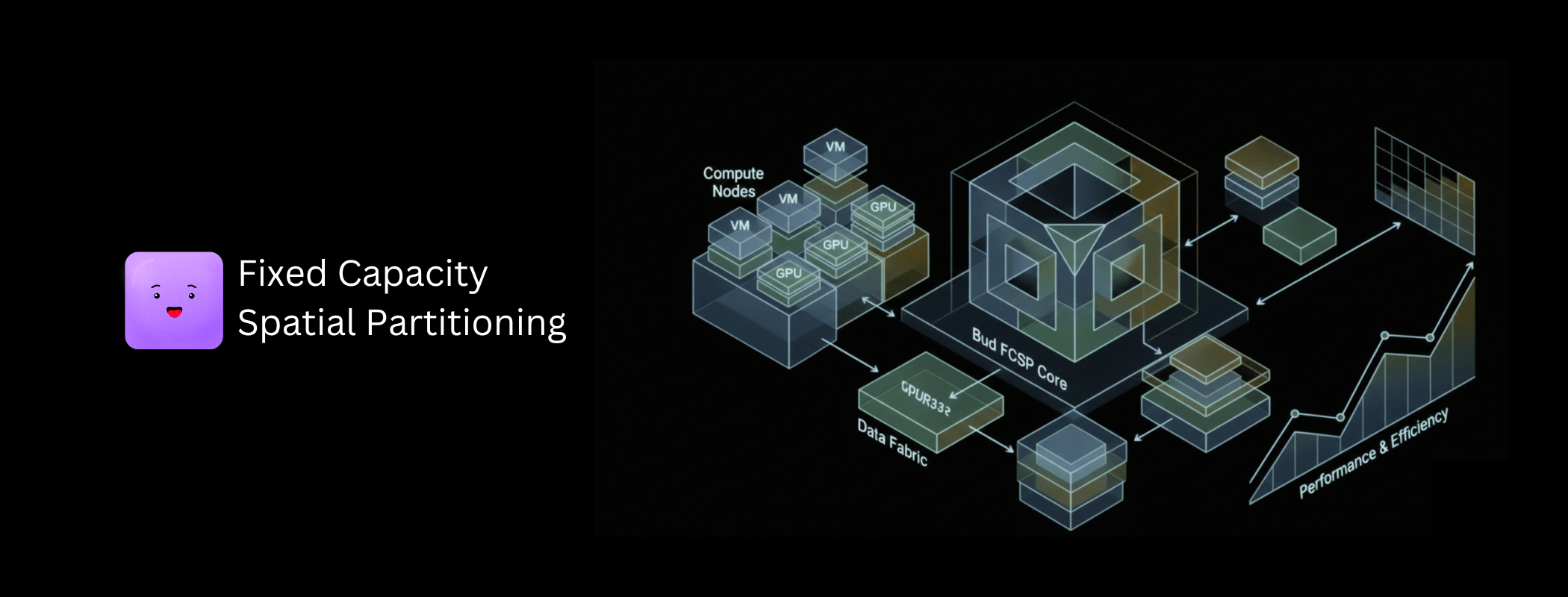
If you’ve ever tried to share a GPU between multiple users or workloads in a Kubernetes cluster, you’ve probably heard of NVIDIA’s Multi-Instance GPU (MIG) technology. It’s the official, hardware-backed solution for GPU partitioning. But what if I told you there’s a compelling software alternative that might actually be better for your use case?
Enter FCSP (Fixed Capacity Spatial Partition) – a sophisticated software-based GPU virtualization library that provides MIG-like multi-tenant isolation without the hardware constraints. In this article, we’ll explore when and why you might choose FCSP over native MIG, backed by real benchmarks and production considerations.
What is NVIDIA MIG?
Multi-Instance GPU (MIG) is a hardware feature introduced with NVIDIA Ampere architecture (A100) and continued in Hopper (H100) GPUs. It allows a single physical GPU to be partitioned into up to 7 isolated instances, each with dedicated:
- Memory: Physically isolated memory regions
- SMs (Streaming Multiprocessors): Dedicated compute units
- Memory Controllers: Guaranteed memory bandwidth
MIG partitions are “hard” – once created, they’re fixed until explicitly reconfigured. Each MIG instance appears as a separate GPU to CUDA applications.
What is FCSP?
FCSP is a software-based GPU virtualization layer that achieves similar multi-tenant isolation through:
- LD_PRELOAD interception: Transparent CUDA API interception
- Token-bucket rate limiting: Fine-grained compute time allocation
- Memory quota enforcement: Hard/soft memory limits per process
- Work-conserving scheduling: Unused resources flow to active tenants
- Intelligent prefetching: UVM-based memory oversubscription
The key difference: FCSP operates entirely in software, works on any CUDA-capable GPU, and provides dynamic, flexible resource allocation.
The Problem with MIG
MIG is excellent technology, but it comes with significant limitations such as strict hardware requirements, static partitioning, limited partition profiles, and the potential for wasted resources.
1. Hardware Requirements
MIG (Multi-Instance GPU) support is limited to a very small set of NVIDIA’s data center–class GPUs. Specifically, MIG is available only on the A100 (both 40GB and 80GB variants), A30, H100, and H200. These GPUs are designed for large-scale enterprise and cloud environments, where hardware-level isolation and fine-grained GPU partitioning are critical for multi-tenant workloads.
Outside of this narrow group, MIG is not supported. Consumer GPUs do not offer MIG capabilities, and neither do older or lower-tier data center accelerators such as the V100 or T4. Likewise, no RTX-series GPUs—regardless of their performance—can use MIG. In practical terms, this means that MIG is exclusively a feature of NVIDIA’s most expensive, modern data center GPUs, and it is not an option for systems built on consumer or legacy hardware.
2. Static Partitioning
MIG partitions are fixed at creation time. It requires;
- No running CUDA processes
- MIG mode enabled (requires GPU reset)
- Specific, predefined partition profiles
$ nvidia-smi mig -cgi 9,9,9 -C # Create 3 MIG instances
# GPU must be idle, process disruption required
Changing MIG partition sizes is not a simple or flexible operation. To make any adjustments, all running workloads must first be terminated. Existing MIG instances then need to be destroyed and recreated with the new configuration, after which workloads must be restarted. This process is inherently disruptive and introduces operational overhead, making it both time-consuming and costly in production environments.
3. Limited Partition Profiles
MIG doesn’t allow arbitrary resource splits. You’re limited to predefined profiles:
| A100-80GB Profile | Memory | SMs | Instances |
| 1g.10gb | 10GB | 14 | Up to 7 |
| 2g.20gb | 20GB | 28 | Up to 3 |
| 3g.40gb | 40GB | 42 | Up to 2 |
| 7g.80gb | 80GB | 98 | 1 |
MIG offers little flexibility in how resources are divided. You cannot create arbitrary splits such as 30%/70%, evenly divide the GPU into five equal instances, or dynamically rebalance resources as workload demands change. You are constrained to a small set of predefined profiles, which often fail to align with real-world usage patterns.
4. Wasted Resources
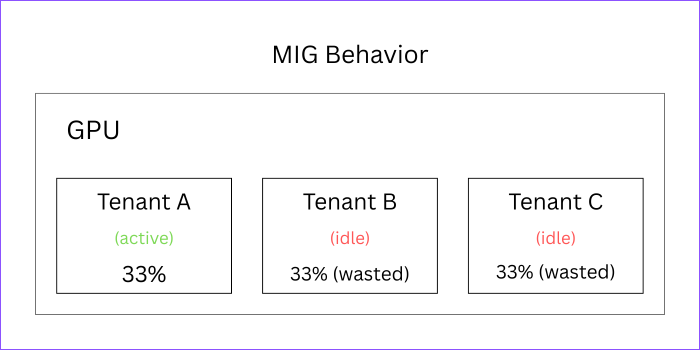
With MIG’s static allocation, idle instances can’t share resources. For example consider a scenario where 3 MIG instances are present but only one tenant is active. Here, Tenant A limited to 33% even though 67% of hardware resources are idle.

How FCSP Solves These Problems
1. Universal GPU Support
FCSP delivers universal support across virtually all CUDA-enabled GPUs. For example, even an RTX 3080 can now offer MIG-like isolation, while a V100 cluster gains true multi-tenancy—without requiring specialized or next-generation hardware. FCSP-Supported GPUs include;
- All Data Center: A100, H100, V100, T4, A10, L4, etc.
- All Professional: RTX A6000, RTX 4000/5000/6000, etc
- All Consumer: RTX 3080/3090/4080/4090, etc
- Legacy: GTX 1080 Ti, Titan V, etc
- Minimum: CUDA Compute Capability 3.0+
2. Dynamic Resource Allocation
FCSP partitions can be adjusted dynamically at runtime without disrupting running workloads—no restarts, no service interruption, and instant rebalancing as demands change.
|
1 2 3 4 5 6 7 8 9 |
# Change tenant limits on the fly $ export BUD_SM_LIMIT=50 # 50% compute $ export BUD_MEMORY_LIMIT=8G # 8GB memory # Or per-device $ export BUD_SM_LIMIT_DEV0=30 $ export BUD_SM_LIMIT_DEV1=70 # Changes take effect immediately for new allocations |
3. Arbitrary Resource Splits
You can define GPU partition sizes at any percentage you choose, with precise control over how resources are allocated. For example;
Tenant A: 25% compute, 4GB memory
Tenant B: 35% compute, 6GB memory
Tenant C: 40% compute, 10GB memory
# Or dynamic fair-share $ export
BUD_ISOLATION_MODE=adaptive # Resources automatically balance based on demand
4. Work-Conserving Scheduling
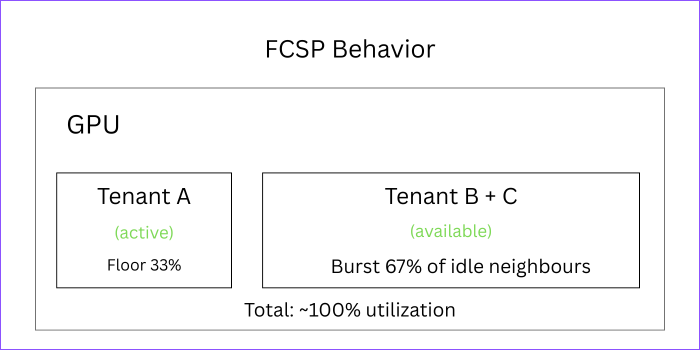
This is FCSP’s standout feature: idle GPU resources automatically flow to active tenants, maximizing utilization without any manual effort. For example, in a scenario with three tenants, if only Tenant A is active, it can use the full GPU. As other tenants become active, resources are dynamically reclaimed and redistributed. Our benchmarks demonstrate this can achieve up to 143.9% efficiency compared to static allocation—exceeding 100% because compute-heavy and memory-heavy workloads complement each other perfectly.

FCSP Architecture Deep Dive
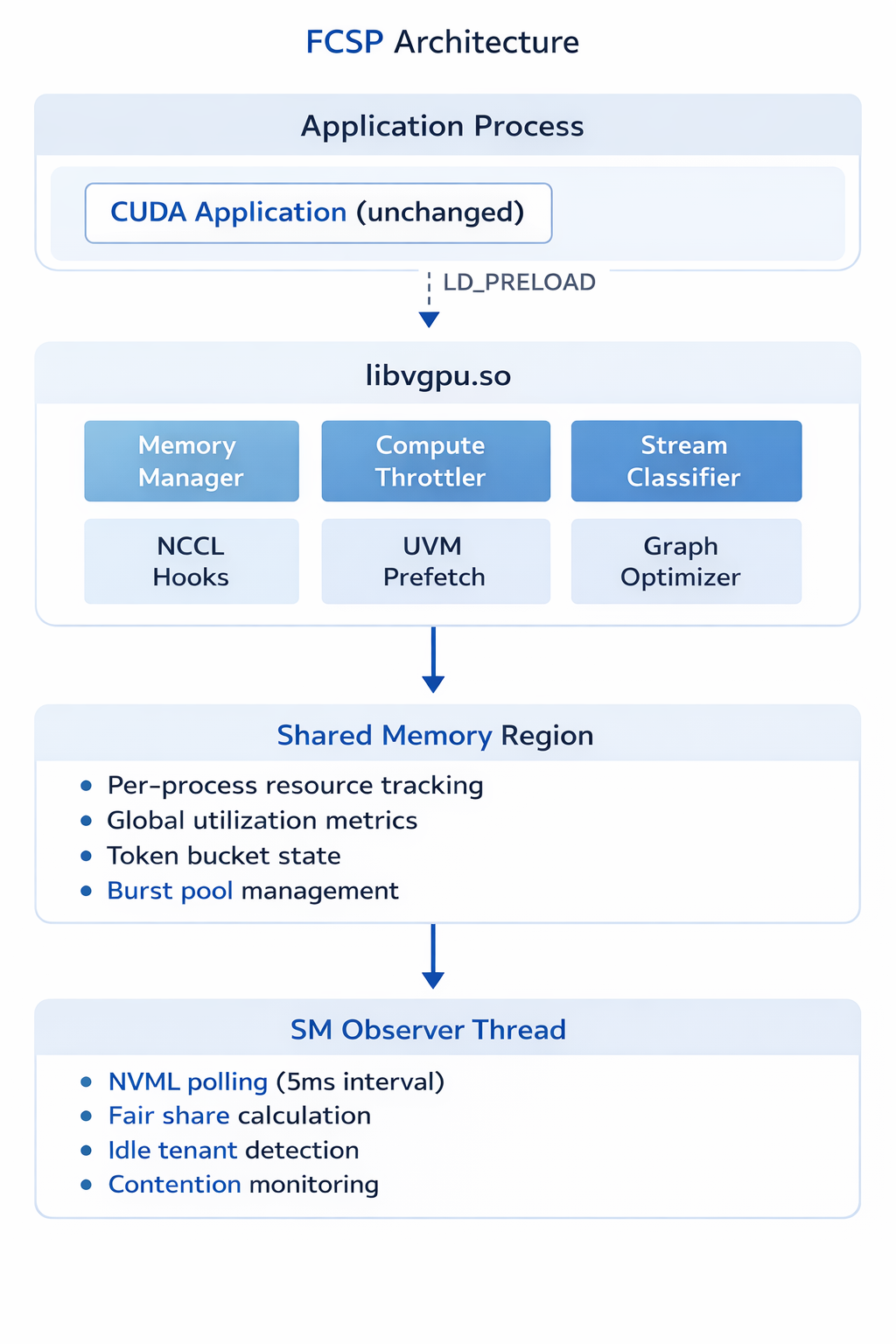
The core components of FCSP form a layered architecture designed to deliver dynamic, fine-grained GPU partitioning and multi-tenant resource management without modifying existing applications. At the top level, CUDA applications run unmodified, with FCSP intercepting GPU calls via LD_PRELOAD to integrate seamlessly. The heart of the system is libvgpu.so, which orchestrates resource allocation through modules such as the Memory Manager, Compute Throttler, and Stream Classifier, while also handling NCCL hooks, UVM prefetching, and graph optimization to maximize GPU efficiency.
Resource usage is tracked in a shared memory region, maintaining per-process metrics, global utilization data, token bucket states, and burst pool management, enabling real-time visibility into GPU activity. The SM Observer Thread continuously monitors GPU status via NVML, calculates fair-share allocations, detects idle tenants, and tracks contention, ensuring resources are dynamically rebalanced. Together, these components allow FCSP to deliver high efficiency, flexibility, and multi-tenancy on any CUDA-enabled GPU.
Core Components

Isolation Modes
FCSP provides four isolation modes to match your requirements:
1. None (BUD_ISOLATION_MODE=none)
- No isolation enforcement
- Useful for single-tenant scenarios
- Minimal overhead (~40ns per API call)
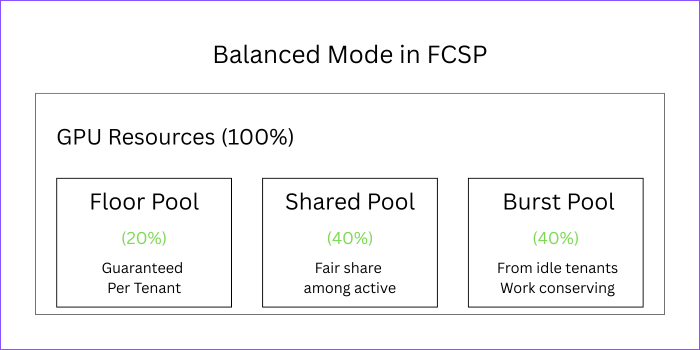
2. Balanced (BUD_ISOLATION_MODE=balanced)
- Default mode
- Fair sharing with burst capability
- 20% floor + 40% shared pool + 40% burst pool
- Best for mixed workloads

3. Strict (BUD_ISOLATION_MODE=strict)
- Hard quotas, no bursting
- MIG-like behavior
- Maximum isolation, minimum efficiency
4. Adaptive (BUD_ISOLATION_MODE=adaptive)
- Automatically switches based on contention
- Low contention → relaxed limits (more throughput)
- High contention → strict limits (better isolation)
- Best of both worlds
Rate Limiting Implementation
FCSP uses a sophisticated token bucket algorithm:
|
1 2 3 4 5 6 7 8 9 10 |
// Per-stream token buckets (eliminates CAS contention) typedef struct { _Atomic int64_t tokens; // Current tokens int64_t max_tokens; // Bucket capacity int64_t refill_rate; // Tokens per second uint64_t last_update; // Last refill timestamp } token_bucket_t; // Kernel launch cost = grids × blocks × TOKEN_FACTOR(32) // Example: 256 grids × 256 blocks = 2,097,152 tokens |
The system also includes:
- Batch token consumption: Thread-local caching reduces atomic operations by 8-16x
- PID controller: Smooth rate limiting with proportional-integral-derivative control
- Exponential backoff: Graceful throttling (50ns → 10µs)
Memory Management
FCSP provides flexible memory limits:
|
1 2 3 4 5 6 7 8 9 10 11 12 13 |
# Absolute limit export BUD_MEMORY_LIMIT=8G # Percentage of GPU memory export BUD_MEMORY_LIMIT=50% # Enforcement modes export BUD_MEMORY_LIMIT_MODE=hard # Reject allocations export BUD_MEMORY_LIMIT_MODE=soft # Warning + callback # Per-device limits export BUD_MEMORY_LIMIT_DEV0=4G export BUD_MEMORY_LIMIT_DEV1=8G |
Plus advanced UVM (Unified Virtual Memory) features:
- Intelligent prefetching: Predict and prefetch based on access patterns
- Memory pressure monitoring: Early warning at 70%, 85%, 95% thresholds
- Automatic eviction: LRU, access-aware, or FIFO policies
- Oversubscription: Use more GPU memory than physically available
Benchmark Comparison
Let’s look at real numbers comparing FCSP to native execution and MIG.
Test Environment
- GPU: NVIDIA RTX 3080 (10GB, 68 SMs)
- FCSP: Adaptive isolation mode
- Iterations: 100 per test
Overhead Metrics
| Metric | Native | FCSP | MIG (A100) |
| Kernel Launch Latency | ~3 µs | 4.9 µs | ~3.5 µs |
| Memory Alloc Latency | ~100 µs | 704 µs | ~100 µs |
| API Interception | 0 ns | 40 ns | 0 ns |
| Rate Limiter | N/A | 1.5 µs | N/A |
Analysis: FCSP adds ~2µs overhead per kernel launch – negligible for typical GPU workloads where kernels run for milliseconds. Memory allocation is slower due to tracking, but this is amortized over the allocation lifetime.
Isolation Metrics
| Metric | FCSP (Balanced) | FCSP (Adaptive) | MIG |
| Fairness Index | 0.996 | 0.996 | 1.0 |
| QoS Consistency (CV) | 0.07 | 0.07 | <0.05 |
| Noisy Neighbor Impact | 11.5% | 4.66% | ~3% |
| Cross-Tenant Isolation | 81.4% | 81.4% | ~95% |
Analysis: FCSP achieves near-perfect fairness (0.996 out of 1.0). With adaptive isolation, noisy neighbor impact drops to 4.66% – approaching MIG’s ~3%. The tradeoff is flexibility: FCSP allows work-conservation, MIG doesn’t.
Efficiency Metrics
| Metric | FCSP | MIG |
| Affinity Complementary Efficiency | 143.9% | N/A |
| Work Conservation Benefit | Up to 67% | 0% |
| Resource Utilization (3 idle, 1 active) | ~100% | 33% |
Analysis: FCSP’s work-conservation is a game-changer. When tenants are idle, active tenants can use the full GPU. MIG wastes 67% of resources in this scenario.
Feature Comparison Matrix
| Feature | FCSP | MIG |
| Hardware Support | ||
| Consumer GPUs (RTX) | ✅ | ❌ |
| V100, T4, A10 | ✅ | ❌ |
| A100, H100 | ✅ | ✅ |
| Partitioning | ||
| Arbitrary splits | ✅ | ❌ |
| Dynamic resizing | ✅ | ❌ |
| No-disruption changes | ✅ | ❌ |
| Work-conservation | ✅ | ❌ |
| Isolation | ||
| Memory isolation | Software | Hardware |
| Compute isolation | Software | Hardware |
| Fault isolation | Partial | Complete |
| Error containment | Per-process | Per-instance |
| Performance | ||
| Zero overhead option | ✅ | ✅ |
| Burst capability | ✅ | ❌ |
| QoS guarantees | Soft | Hard |
| Operations | ||
| Kubernetes integration | Via device plugin | Native |
| Monitoring | NVML + custom | NVML |
| Configuration | Env vars | nvidia-smi |
Use Cases: When to Choose FCSP vs MIG
This section highlights the use cases for FCSP compared to MIG, helping you understand when each approach is most suitable. It provides guidance on choosing the right GPU partitioning solution based on workload needs, resource flexibility, and operational requirements.
When to choose FCSP?
Choose FCSP when you need flexible, dynamic GPU partitioning with multi-tenant support across any CUDA-enabled GPU. For example, it can be the right choice in the following scenarios;
1. You Don’t Have MIG-Capable GPUs
The most straightforward scenario for choosing FCSP is when your environment includes consumer GPUs like the RTX series, older data center GPUs such as V100, T4, or P100, or mixed GPU clusters. In these cases, FCSP is the only solution that provides true multi-tenant isolation, enabling dynamic partitioning and efficient resource sharing across hardware that MIG does not support.
2. You Need Dynamic Resource Allocation
Choose FCSP when you require dynamic resource allocation that adapts to changing workload demands in real time.
|
1 2 3 4 5 6 7 8 9 10 11 12 13 |
# Kubernetes scenario: Training job needs more resources during backprop apiVersion: v1 kind: Pod metadata: name: training-job spec: containers: - name: trainer env: - name: BUD_SM_LIMIT value: "50" # Start at 50% # FCSP allows runtime adjustment: # kubectl exec training-job -- export BUD_SM_LIMIT=80 |
3. Variable Workload Patterns
Choose FCSP when your workloads have variable or unpredictable patterns that require flexible GPU resource management. It’s ideal for development environments that burst during testing and remain idle while coding, batch processing jobs that start and finish at different times, and time-sharing scenarios where different users are active at different hours.
An example Workday Pattern (Work-Conservation):
- 9:00 AM: All 4 tenants active → 25% each
- 12:00 PM: Tenant B at lunch → A,C,D get 33% each
- 2:00 PM: Tenant D in meeting → A,C get 50% each
- 6:00 PM: Only Tenant A working → A gets 100%
In such a scenario, using MIG would waste 75% of resources at 6 PM. But FCSP uses everything.
4. Complementary Workload Scheduling
FCSP’s workload affinity feature can co-schedule compute-heavy and memory-heavy workloads for better-than-isolated performance:
Without Affinity
- Compute-heavy job: 50% SM utilization, 10% memory BW
- Memory-heavy job: 10% SM utilization, 50% memory BW
- Total GPU utilization: ~55% (many resources idle)
With FCSP Affinity:
- Total GPU utilization: 60% SM + 60% memory BW
- Both jobs run together
- Efficiency: 143.9% vs isolated execution
5. LLM Inference at Scale
LLM inference presents unique challenges, including bursty memory allocation for KV caches, mixed compute patterns such as attention versus feed-forward networks, and variable batch sizes. FCSP addresses these demands with LLM-optimized profiles, ensuring efficient resource allocation and high performance for large language model workloads.
|
1 2 3 4 |
# LLM-optimized UVM configuration export BUD_UVM_PROFILE=llm_inference # Enables: larger prefetch (64MB), aggressive pattern detection, # handles bursty KV cache, optimized for attention patterns |
When to choose MIG?
Choose MIG when you need fixed, hardware-level GPU partitioning on supported NVIDIA data center GPUs.
1. Maximum Isolation is Critical
If tenant A crashing must never impact tenant B—such as in financial trading systems, medical imaging, or other safety-critical applications—MIG is the preferred choice for its hardware-level fault isolation, whereas FCSP offers process-level isolation.
2. Regulatory Compliance Requires Hardware Isolation
Certain compliance frameworks explicitly mandate hardware-level isolation, including HIPAA for healthcare, PCI-DSS for payment processing, and SOC 2 Type II. In these cases, MIG’s hardware partitioning can meet auditor requirements where software-based isolation like FCSP may not.
3. Guaranteed, Predictable Performance
MIG provides hard QoS guarantees:
MIG Instance: 1g.10gb
- Guaranteed: 14 SMs (always)
- Guaranteed: 10GB memory (always)
- No variability, no neighbors
FCSP (even with strict mode):
- Target: 14 SMs
- Actual: 13-15 SMs (software scheduling variance)
- Approx 0.07 coefficient of variation
If your SLA requires “exactly 14 SMs, never less”, use MIG.
4. You Have A100/H100 and Static Workloads
If you have:
- MIG-capable hardware (A100, H100)
- Predictable, always-on workloads
- No need for resource flexibility
MIG is simpler to operate and has zero runtime overhead.
Configuration Guide
The Configuration Guide provides step-by-step instructions to set up and optimize FCSP for your GPU environment.
Basic FCSP Setup
|
1 2 3 4 5 6 7 |
# 1. Build FCSP cd bud_fcsp && mkdir build && cd build cmake .. -DCMAKE_BUILD_TYPE=Release make -j8 # 2. Run with FCSP LD_PRELOAD=/path/to/libvgpu.so python train.py |
Multi-Tenant Kubernetes Deployment
|
1 2 3 4 5 6 7 8 9 10 11 12 13 14 15 16 17 18 19 20 21 22 23 24 25 26 27 28 29 30 31 32 33 34 35 36 37 38 39 40 41 42 |
# ConfigMap for FCSP settings apiVersion: v1 kind: ConfigMap metadata: name: fcsp-config data: isolation-mode: "adaptive" tenant-floor: "20" shared-pool: "40" burst-pool: "40" --- # Pod with FCSP isolation apiVersion: v1 kind: Pod metadata: name: ml-workload labels: fcsp.io/tenant: "team-a" spec: containers: - name: training image: pytorch/pytorch:latest env: - name: LD_PRELOAD value: "/opt/fcsp/libvgpu.so" - name: BUD_ISOLATION_MODE valueFrom: configMapKeyRef: name: fcsp-config key: isolation-mode - name: BUD_SM_LIMIT value: "50" - name: BUD_MEMORY_LIMIT value: "8G" volumeMounts: - name: fcsp-lib mountPath: /opt/fcsp volumes: - name: fcsp-lib hostPath: path: /usr/local/lib/fcsp |
Production Configuration Profiles
Profile 1: Development Cluster
|
1 2 3 4 5 6 |
# Maximize flexibility, allow bursting export BUD_ISOLATION_MODE=adaptive export BUD_TENANT_FLOOR_PCT=10 # Low guaranteed floor export BUD_SHARED_POOL_PCT=30 # Moderate shared pool export BUD_BURST_MAX_PCT=60 # High burst capability export BUD_ADAPTIVE_SM_MAX_BURST_PCT=100 # Allow full burst |
Profile 2: Production ML Serving
|
1 2 3 4 5 6 |
# Balance isolation and efficiency export BUD_ISOLATION_MODE=balanced export BUD_TENANT_FLOOR_PCT=40 # High guaranteed floor export BUD_SHARED_POOL_PCT=30 # Moderate shared pool export BUD_BURST_MAX_PCT=30 # Limited burst export BUD_COOPERATIVE_MODE=1 # Smooth throttling |
Profile 3: High-Isolation Multi-Tenant
|
1 2 3 4 5 |
# Maximum isolation, MIG-like behavior export BUD_ISOLATION_MODE=strict export BUD_TENANT_FLOOR_PCT=100 # All resources guaranteed export BUD_SHARED_POOL_PCT=0 # No sharing export BUD_BURST_MAX_PCT=0 # No bursting |
Performance Tuning
Performance Tuning offers strategies to maximize GPU efficiency and workload throughput with FCSP.
Reducing Overhead
|
1 2 3 4 5 6 7 8 9 10 11 12 |
# 1. Enable fast paths (default in production) export BUD_FAST_PATH_ENABLED=1 # 2. Increase batch token size for high-throughput export BATCH_TOKENS_DEFAULT_SIZE=64 # Default: 16 # 3. Disable unnecessary features export BUD_ENABLE_METRICS=0 # If not monitoring export BUD_LOG_LEVEL=error # Reduce logging # 4. Use SIMD optimizations (auto-detected) # FCSP automatically uses AVX2/SSE4.2 for slot finding |
Improving Isolation
|
1 2 3 4 5 6 7 8 9 10 11 12 13 |
# 1. Use adaptive mode for dynamic workloads export BUD_ISOLATION_MODE=adaptive # 2. Increase floor for better guarantees export BUD_TENANT_FLOOR_PCT=40 # 3. Enable PID controller for smooth throttling export BUD_USE_PID_CONTROLLER=1 export PID_DEFAULT_KP=0.8 export PID_DEFAULT_KI=0.2 # 4. Reduce observer interval for faster response export BUD_OBSERVER_INTERVAL_US=2000 # 2ms instead of 5ms |
Memory Oversubscription (UVM)
|
1 2 3 4 5 6 7 8 9 10 |
# Enable UVM oversubscription for large models export BUD_UVM_ENABLED=1 export BUD_UVM_PROFILE=llm_inference # Or manual configuration export BUD_UVM_PRESSURE_WARNING_PCT=70 export BUD_UVM_PRESSURE_HIGH_PCT=85 export BUD_UVM_PRESSURE_CRITICAL_PCT=95 export BUD_PREFETCH_ENABLED=1 export BUD_PREFETCH_MAX_SIZE_MB=64 |
Limitations and Considerations
Both FCSP and MIG have trade-offs that should be carefully considered when choosing the right GPU partitioning solution.
FCSP Limitations
- Software Isolation Only: A malicious or buggy tenant could potentially bypass isolation (MIG has hardware enforcement)
- Overhead: ~2µs per kernel launch, ~600µs for memory allocation (negligible for most workloads, but measurable)
- No Hardware Error Isolation: GPU errors (ECC, timeouts) affect all tenants
- Requires LD_PRELOAD: Application must use dynamically-linked CUDA
- Approximated Metrics: SM utilization is polled (5ms interval), not instantaneous
MIG Limitations
- Limited Hardware: Only A100, A30, H100, H200
- Fixed Profiles: Cannot create arbitrary partition sizes
- Static Allocation: Requires workload termination to resize
- No Work Conservation: Idle resources are wasted
- Reduced Total Performance: Sum of MIG instances < full GPU performance
- Complexity: More infrastructure to manage (MIG instances, CUDA MIG handles)
Conclusion
The choice between FCSP and MIG isn’t about which is “better” – it’s about which fits your requirements:
| Requirement | Recommendation |
| No MIG hardware | FCSP (only option) |
| Dynamic workloads | FCSP (work-conservation) |
| Maximum isolation | MIG (hardware guarantee) |
| Compliance requirements | MIG (auditable hardware) |
| Development clusters | FCSP (flexibility) |
| Predictable production | MIG (simplicity) |
| Mixed GPU types | FCSP (universal support) |
| LLM inference | FCSP (optimized profiles) |
For most practical scenarios, FCSP provides 80-95% of MIG’s isolation benefits with significantly more flexibility and universal hardware support. The work-conservation feature alone can improve cluster utilization by 40-67% in realistic multi-tenant scenarios. Consider FCSP when you value flexibility, efficiency, and broad hardware support. Choose MIG when you need the absolute guarantee of hardware isolation and have compatible GPUs.
This article is based on FCSP v1.0 and NVIDIA MIG as of December 2025. Benchmarks were conducted on an NVIDIA RTX 3080 (10GB, 68 SMs) with CUDA 12.0.